Features
From tenant documents to a certified record
Verifikor runs the income-certification workflow for LIHTC and affordable-housing properties: document collection, income calculation, eligibility determination, and the audit record.
How it works
Five steps, the same for every household
Documents are read automatically, a person confirms every figure against the scan, and fixed program rules make the decision.
- 01
Set up a property
A three-step wizard covers the basics, income limits, and units, and saves everything at the end. HUD's published income limits fill in for the county, year, and AMI level, and unit lists can be pasted from a spreadsheet.
- 02
Collect documents
Staff upload pay stubs and benefit letters directly, or send the household a secure upload link by email or text.
- 03
Confirm against the scan
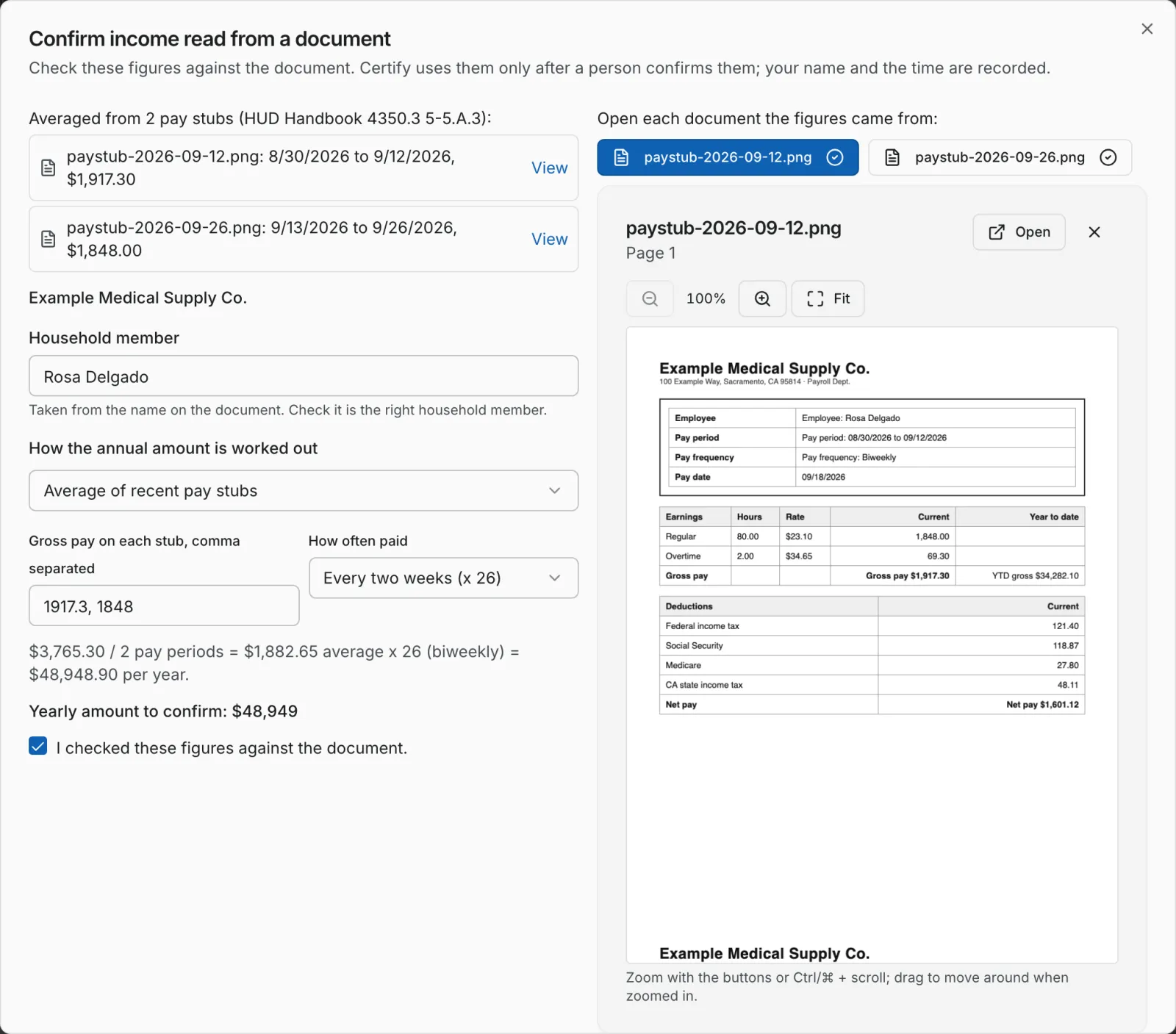
Income figures are read from each document automatically. A staff member opens the document beside the figures and confirms them before they are used.
- 04
Determine eligibility
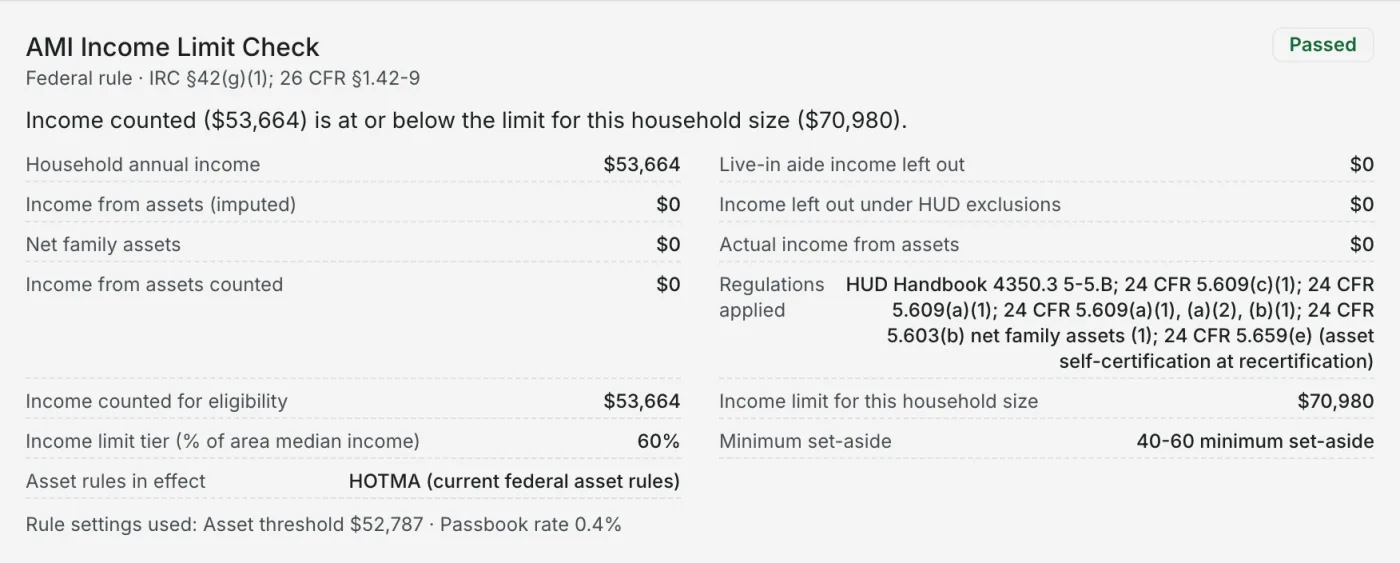
Household income is tested against the right limit for the county and household size. Each result shows the calculation and the regulation it applies.
- 05
Certify and keep the record
The certification is locked. Corrections create a new version, and the original stays exactly as it was.
Confirm against the scan
A person checks every figure against the document
The scan opens beside the figures read from it. Nothing counts until a staff member ticks "I checked these figures against the document."
Rules with citations
Each result shows the figures and the regulation
Every rule lists what it used, what it found and the citation it applied, so a reviewer can follow the calculation.
Before the auditor does
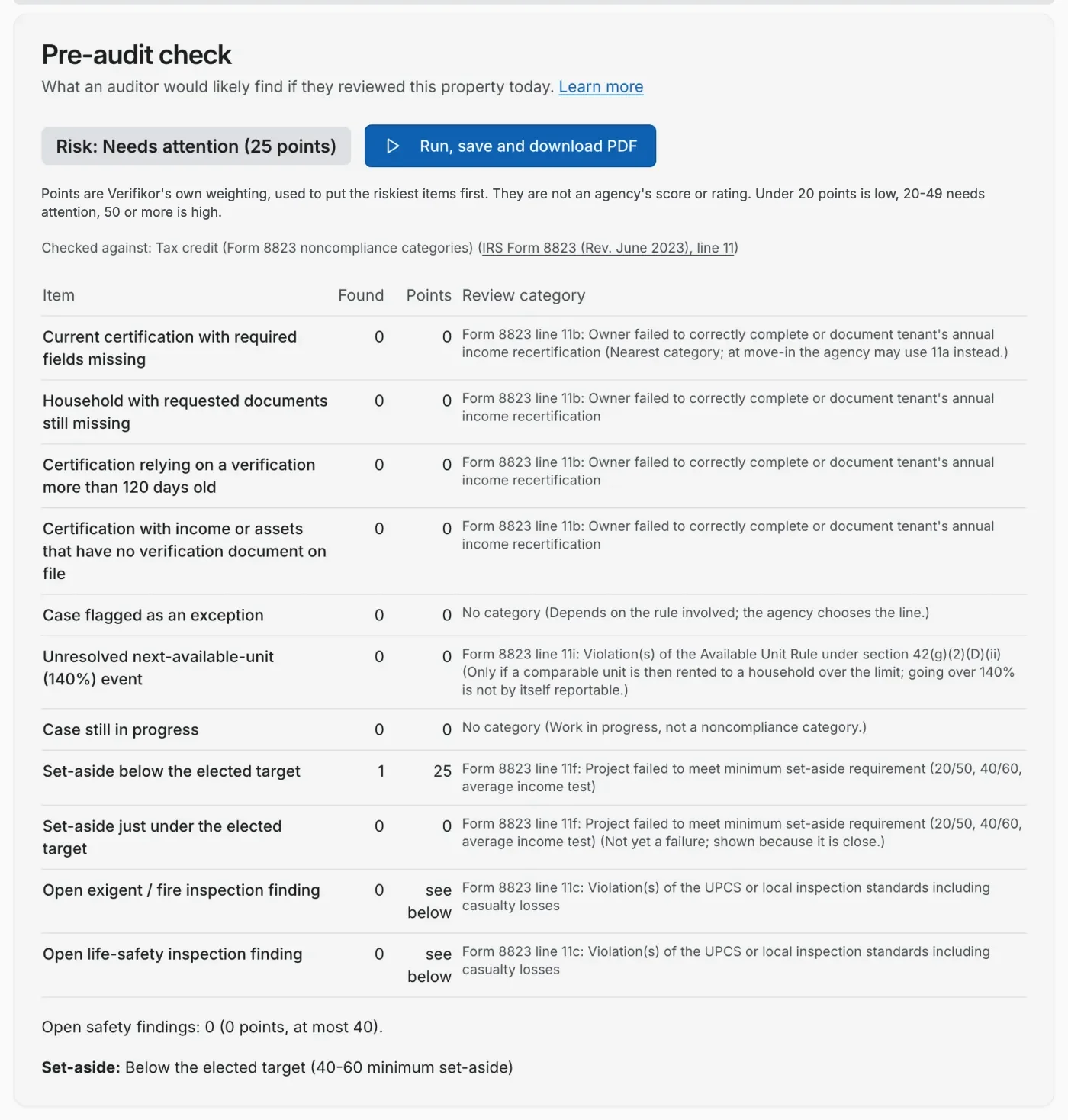
A pre-audit check on the whole property
What a reviewer would likely find today, each item mapped to its Form 8823 category, with the riskiest first.
Records can't be edited after they're certified
Every change is logged with who, when, why
On audit day, you can prove what you certified on any date
Included
Everything in the product today
Document reading with staff review
- Reads employer, gross amount, and pay frequency from pay stubs and benefit letters.
- Every extracted field carries a confidence score and shows where on the page it was read from; low-confidence fields are flagged.
- Nothing read from a document counts until a staff member opens the document and confirms the figures against it. Their name and the time are recorded.
- Every document on a case must be accounted for before certifying. Pay stubs from the same job are averaged, not counted twice, and a W-2 is labeled as last year's wages.
Rules-based eligibility decisions
- Eligibility is decided by fixed, versioned program rules, not by AI.
- The same inputs and rule version always produce the same answer.
- Every evaluation stores the computed values, the rule version, and the regulatory citation.
- LIHTC rules cover income limits, asset income before and after HOTMA, rent limits, student status, live-in aides, and the 140% next available unit rule.
Layered programs in one pass
- Mark a property, or each unit, for LIHTC plus HUD programs or HOME.
- Each program's rules are checked and its result shown; the strictest result decides.
- HUD adjusted-income deductions and tenant rent rules apply where the program requires them.
- HOME households are checked against HUD's HOME income limits and each unit's High or Low HOME rent.
Records that hold up on audit day
- Records can't be edited after they're certified.
- Every change is logged with who, when, and why.
- On audit day, you can prove what you certified on any date: replay any certification and confirm on screen that nothing has changed since.
Tenant upload links
- Send a household a secure link by email or text message.
- Tenants upload from their phone. No account or app required.
- The upload page is available in English and Spanish.
- Each link is tied to a single case and expires.
- At recertification time, send every household on a property its own link at once.
Screening for other assistance
- Using income already on file, each household is screened against SNAP, WIC, and LIHEAP income thresholds.
- Programs the household may qualify for are flagged on the case.
- Housing certification and benefit screening are labeled separately so they are never confused.
Reports, forms, and audit packets
- Audit packets: a PDF assembled from certifications and their evidence, on demand.
- California's Tenant Income Certification (CTCAC), filled in from certified data. For New York, Texas, Florida, Washington, and Massachusetts, a certification summary with the form's fields, not the agency's own form.
- Form 8823 noncompliance findings prepared from the record, ready for your state agency's review, when a certification has a finding.
- Compliance summary and exceptions reports.
Property compliance view
- A compliance score for each property, with the inputs that drive it.
- A pre-audit check that summarizes where a property is exposed today.
- Upcoming recertifications in one list.
Teams, imports, and sharing
- Invite teammates with role-based permissions.
- Import units, rent limits, and utility allowances from CSV exports of Yardi, RealPage, MRI, ResMan, Entrata, AppFolio, Buildium, and Rent Manager.
- Share a read-only compliance view with investors through a secure link.
- Each organization's data is kept separate from every other organization's.
Nothing to install. Sign in from any browser.